
Why to go for Kinsta Managed Hosting, Here it will be shown. It has really good for all Small, Medium, Large.
Kinsta has combined the fastest network and platform in the world (Google Cloud), and it utilizes the best engineering team and the most experienced WordPress developers. MyKinsta dashboard is built specifically for WordPress, making site management as easy as possible. Kinsta truly made the highest quality WordPress hosting solution on the market.
Choosing a WordPress host can definitely be hard, confusing, and time-consuming.
We will know in depth how Kinsta sets itself apart and what makes it exactly different from other hosts you might have tried in the past. Here most comparisons can typically divided into three categories: cPanel hosts, unmanaged server providers, and managed WordPress hosting providers.
So let’s explore how Kinsta is different, specifically, features and services that are unique to its platform.
Kinsta vs cPanel hosts
cPanel is most widely used online hosting control panel which help in managing your websites easier. WordPress hosting provider that utilize cPanel mostly include shared hosting providers as well as some basic managed VPS/dedicated server providers. These include the largest hosts in the industry such as EIG companies like Bluehost and HostGator as well as Siteground, GoDaddy, and InMotion Hosting.
The average customer uses a shared cPanel hosting plan by only paying a few dollars per month, and at some point will most likely experience slowness or poor support. Why? Because shared hosting overcrowd their servers, which in turn impact the performance of your site. . Shared hosting provider have to spread themselves very thin to even make a profit and this usually leads to an unpleasant experience for the client.
Speed
When you host with Kinsta you’ll see faster page load times, along with back-end (WordPress dashboard) speed .Kinsta hosting infrastructure is built with extremely powerful servers, meaning your sites will not be starved for CPU and RAM resources. It utilizes Google Cloud Platform and their data centers for extremely robust network connections.
Most cPanel hosting provider are slow to upgrade to the latest versions of server-side software such as PHP and MySQL. PHP 7.3 is, in fact, three times faster than PHP 5.6. Due to this Kinsta always offer the latest supported versions including PHP 7.3, 7.4, and 8.0 . You can switch to them at a click of a button. MariaDB, a faster drop-in replacement for MySQL is also a standard on this platform. And in regards to Kinsta web servers, it don’t use Apache as Nginx is much faster.
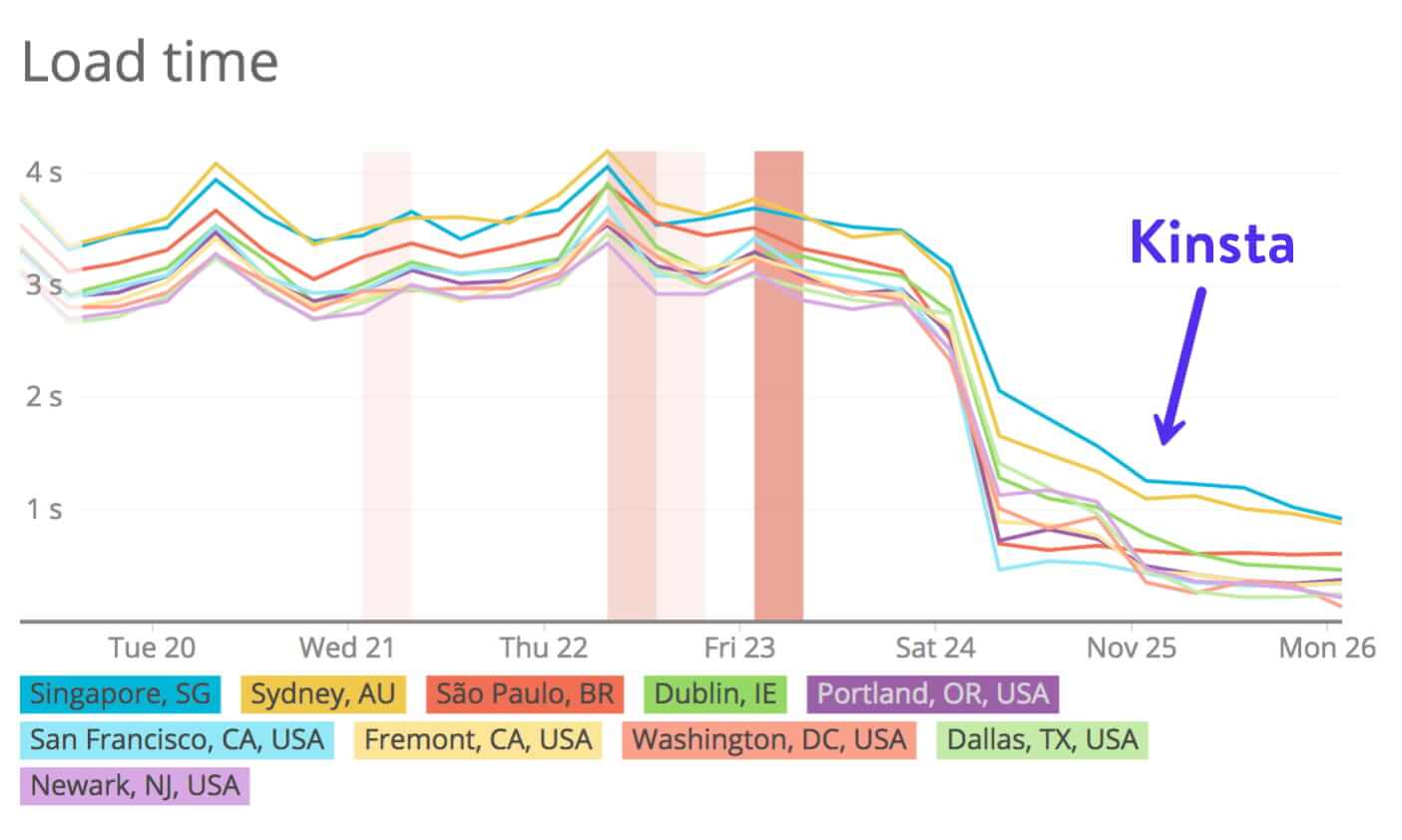
Kinsta’s another aspect of performance is caching, which is the process of storing resources from one request and reusing those resources for subsequent requests. In other words, caching will make your WordPress site load faster. Usually, those with cPanel hosts will utilize a third-party caching plugin to implement this. At Kinsta, you don’t need to worry about messing with any complicated and confusing caching plugins, as this is done at the server-level.
Temporarily limited problem by other hosting
In the shared hosting works, hosts will sometimes take a site down due to it’s overloading a server. They have to do this to prevent it from affecting other customer’s sites. This is one of the biggest flaws with shared hosting. Instead of your WordPress site, you and your visitors are met with a message like this:
The web service to this account has been limited temporarily! There is a server resource usage report open for this account in the User area. To remove the limits, please log into your User area and consider the options avaliable to resolve the case.
Or worse, your WordPress site might start throwing 500 errors because it surpasses the the low thresholds that shared servers have in place. These limits can include all sorts of various server processes, number of concurrent MySQL connections, CPU usage, and even total database size.
Not only this become bad for your brand, but every time when your site is down you losing money. You can be assured that at Kinsta it take a different approach. It consistantly monitor sites 24/7 and if for some reason it determine that perhaps you need more PHP workers or disk space, it reaches out to you and assist in determining the appropriate plan of action for your site.
Kinsta WordPress-Specific features
Kinsta’s hosting solution, as well as its MyKinsta dashboard, is built from the ground up specifically for WordPress. It allows us to provide WordPress-specific features and tools that you won’t find with a host that utilizes cPanel. Many of Kinsta features have come directly from client’s feedback.It actively listen to all requests.
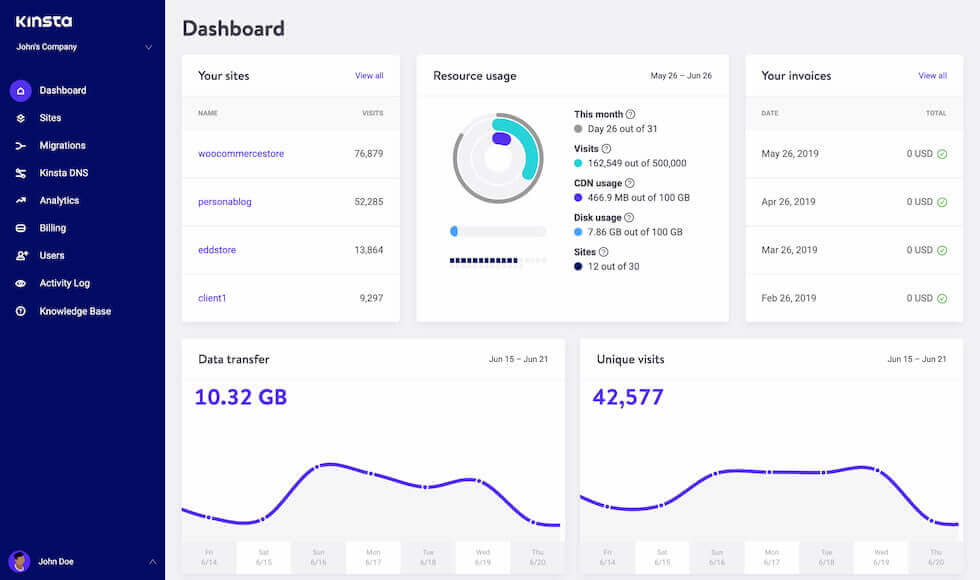
Kinsta also have other premium features, such as easy to use backup systems, simple PHP switching and restarting, easy-to-use SFTP and SSH access. Some of the features might be available from cPanel hosts, but we can promise you they aren’t nearly as easy to find and use as they are at Kinsta.
Kinsta Security
Kinsta have several security measures and it take very seriously, implementing active and passive measures to stop attacks and malicious intent. It continue monitor your sites every minute for uptime, proactively stop malicious code from entering your network, and offer free DDoS protection for all sites hosted on its infrastructure.
In addition to Kinsta’s secure firewall powered by Cloudflare, it also implement tight software-based restrictions and malware scanning daemons that run continuously in the background to protect your WordPress site. The bottom line is: your site is monitored and secured 24/7.
Because of that, Kinsta typically do not recommend installing additional security plugins on your WordPress site. Why? A lot of these types of plugins cause performance issues due to their always-on and scanning functionalities. Kinsta also utilizes Cloudflare’s firewall, which means in some cases IP blocking features of some security plugins won’t work as intended.
This is actually an advantage for you.That means you don’t need to worry or manage as many third-party plugins and you’ll see a boost in performance! If you need extra protection or help to decrease bot and or proxy traffic, Kinsta support team is always standing by in case you need to block an IP from accessing your site.
Server-wise, cPanel hosts will drop you as many sites as you wish into a single /public_html/ directory, but here at Kinsta every site runs in an isolated Linux container, meaning that if one site is ever compromised the rest of your sites are still safely isolated from the affected site. It also offer unlimited hack fixes for free.
Kinsta team is also proactive and always care about your uptime. Due to it continue monitoring your sites 24/7, it will reach out to you if we see something wrong with your site. This way you don’t have to worry about checking it constantly or during the holidays. A few examples of this include:
- Your SSL certificate or domain expires.
- A third-party plugin is causing 500 error.
- An external script is causing long delays.
Kinsta vs unmanaged server providers
Unmanaged server provider is like Rackspace, AWS, or even Google Cloud. These providers offer powerful hardware but client need to build their server from scratch and manage it by themselves. Here’s how Kinsta is different:
Premium features built-in
With unmanaged hardware, you will get an empty box and build whatever your need on top of it. With Kinsta, you get the same sort of server power but it already built those features for you. For example, features such as automatic backups, staging sites, PHP version switching, server redirections, server-based page caching, a free Cloudflare integration, and a search-and-replace tool are already built-in and ready for you to use.
User-friendly
Non-technical users can use Kinsta to easily create new sites, clone existing sites, create staging sites, and more.With Kinsta, non-technical teams, such as marketing and sales teams, can do most tasks for themselves and only reach out to the technical teams when they need a developer.
Time-saving and secure
You don’t have to worry about updating server packages, installing new packages, hardening the server, and managing the infrastructure. Kinsta handles all the infrastructure so that you can focus only on building your sites.
Support Systems
While an unmanaged server provider may provide decent support, it will almost certainly not be WordPress-specific. When you need help, Kinsta support team is always here 24/7 and isn’t afraid to talk about your WordPress site.
Kinsta vs other managed WordPress hosting providers
A managed WordPress host handles all the back-end server related tasks , along with providing support when you need it. Typically these hosts are fine-tuned to work with WordPress and their support teams are good also. These providers can range from shared servers, to VPS, or even dedicated environments.
Kinsta is different from all these Manged hosting provider in terms of free CDN and free premium DNS, free automatic daily backups,ticket response time is less than 2 minutes,Cloudflare Firewall, free, human-performed site migration,encrypted SFTP connections and provides SSH access,automatic MySQL database optimisation,720 daily uptime checks,free DDoS protection,reverse proxy support,free security guarantee and lots of more unique features that other hosting not provides.